
Android Notifications vs. iPhone Notifications: Two Very Different Philosophies
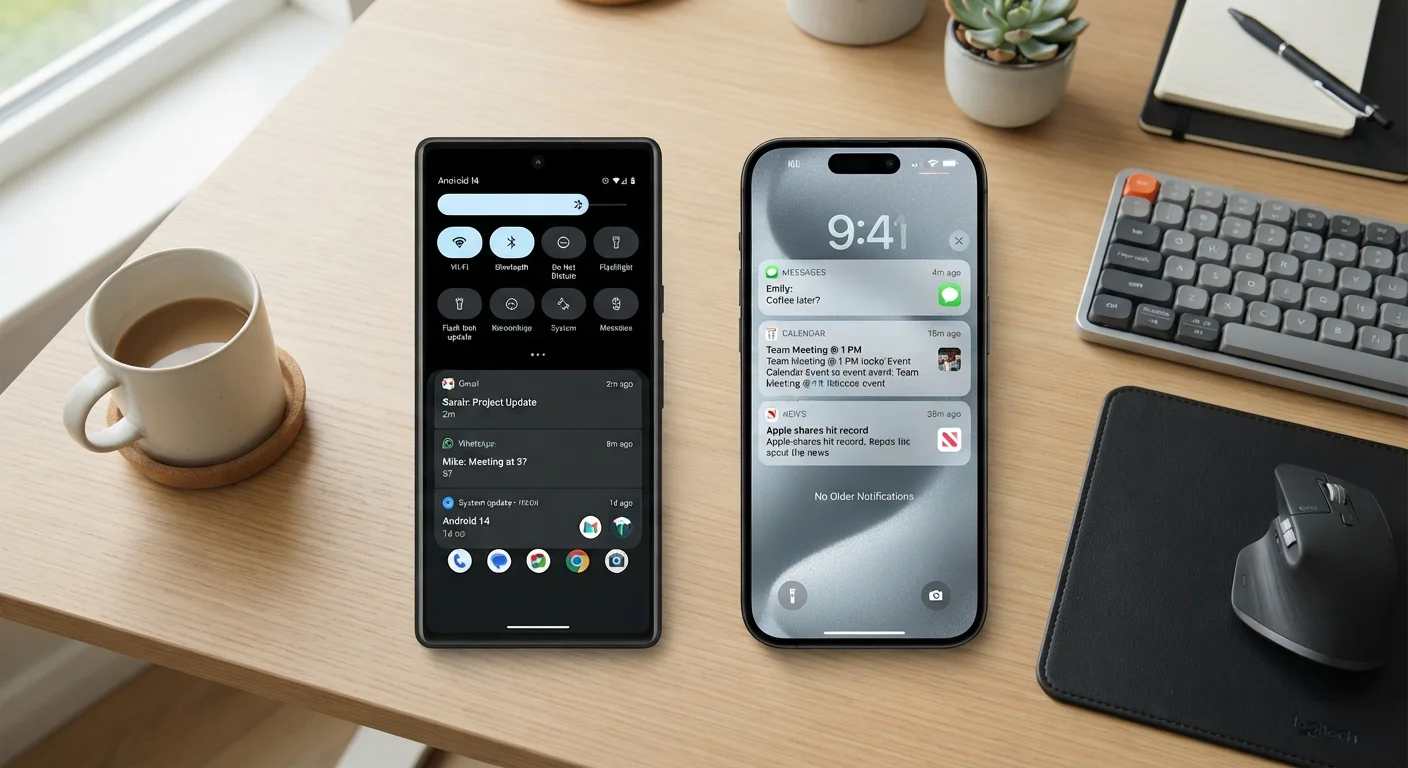
Photo credit: SnippetColumns.com | Easy Search, Reliable Information
In this article
Android and iOS handle alerts differently by design. See how each system works and which approach suits different habits and needs.
Key Takeaways
- Android groups notifications by app and allows rich in-line actions directly from the notification shade.
- iOS uses a time-sorted notification stack and relies on Focus modes to reduce interruptions.
- Android gives more per-app and per-channel control; iOS prioritizes system-wide simplicity.
- Both platforms now support notification summaries, but their delivery logic differs significantly.
- Neither system is objectively better — your habits and tolerance for interruption determine the fit.
The Core Philosophy Divide
Android and iOS were built around different ideas about who should control the notification experience. Android's approach has always leaned toward the user — giving access to granular settings, quick-action buttons, and notification channels that let individual app categories behave differently. iOS has historically leaned toward the system — applying consistent delivery rules, keeping the lock screen readable, and more recently using machine learning to guess which alerts actually need your attention.
Neither philosophy is wrong. They reflect genuinely different assumptions about how people use phones. Understanding which model aligns with your habits is more useful than declaring a winner.
For a broader look at how platform-level settings shape daily use, see our guide to overlooked settings that most users never touch.
How Android Handles Alerts
Android surfaces notifications in a pull-down shade that groups alerts by app. Each notification can carry action buttons — reply, archive, snooze — without requiring you to open the app. Long-pressing a notification gives you a direct path to that app's notification settings, including notification channels: subdivisions within a single app that carry different priorities, sounds, and behaviors.
For example, a messaging app might separate DMs, group chats, and promotional alerts into distinct channels. You can silence group chats entirely while keeping DMs audible. This level of control is baked into the Android framework, so it works consistently across devices.
| Criterion | Android Notifications | iPhone (iOS) Notifications |
|---|---|---|
| Notification grouping | By app, collapsible | Chronological stack |
| Inline actions | Reply, snooze, archive from shade | Limited; expand to access actions |
| Per-app channel control | Yes — multiple channels per app | No — single app-level toggle |
| Distraction management | Do Not Disturb, scheduled rules | Focus modes with allow-lists |
| Notification batching | Limited; manual snooze available | Scheduled summaries built in |
| Third-party app access | Broad — launchers can interact | Restricted to system framework |
| Settings complexity | Deep; rewarding but steep | Simpler; less granular |
Android also supports notification bubbles — floating conversation icons that persist on screen — and allows third-party launchers and apps to interact with notification data in ways iOS doesn't permit. The trade-off is complexity: new users sometimes find the settings tree deep and the terminology unclear.
How iPhone Handles Alerts
iOS organizes notifications chronologically on the lock screen and in a swipe-up Notification Center. Apps can be set to deliver alerts as banners, badges, or lock screen entries — but the channel-level granularity Android offers isn't part of the iOS model. Instead, Apple uses system-wide tools to manage volume.
Focus modes — Work, Personal, Sleep, and custom profiles — act as allow-lists, letting specific contacts or apps break through while everything else is silenced. Notification summaries, delivered at scheduled times, batch lower-priority apps into a single digest, reducing the drip of constant interruptions.
79%
Smartphone users bothered by notification overload
A Deloitte Digital Media Trends survey found the majority of smartphone owners report feeling overwhelmed by the volume of notifications they receive daily.
3–5x
Daily phone checks driven by alerts
Research from RescueTime estimates that notifications are behind the majority of unplanned phone pickups throughout the day.
iOS also uses on-device intelligence to predict which notifications matter most, surfacing them more prominently over time. The system handles this automatically, with limited ability to inspect or override its logic. For users who don't want to spend time in settings, this works well. For users who want to audit exactly what their phone is doing, it can feel opaque.
Notification behavior intersects with broader privacy controls — understanding what each app can do in the background matters. Our complete guide to smartphone privacy settings walks through those decisions in detail.
What This Means for Your Daily Habits
The practical gap shows up most clearly in two scenarios: high-volume communication and distraction management.
Heavy communicators — people fielding messages across several apps — tend to find Android's inline actions and channel controls genuinely useful. Being able to reply, archive, or snooze without leaving the current screen reduces friction noticeably.
People trying to reduce phone dependency often find iOS Focus modes easier to adopt. Setting a Work Focus that only allows calls from contacts and calendar alerts, then switching to a Personal Focus in the evening, is a workflow that doesn't require deep settings knowledge.
Both Platforms Have Evolved Significantly
Android 13 introduced a permission prompt for notifications — apps must now ask before sending alerts, bringing it closer to iOS's long-standing opt-in model. Meanwhile, iOS 16 and later added more granular per-app delivery options. The platforms continue to learn from each other, so specific feature gaps can shift with each annual software update. Check your current OS version's release notes for the most accurate picture of what's available on your device.
It's also worth noting that both platforms have narrowed the gap in recent years. Android has added its own notification prioritization features; iOS has added more granular per-app controls. But the underlying philosophies — user-configured flexibility versus system-managed simplicity — remain distinct. Knowing which one matches how you actually behave with your phone is the clearest guide to which system will feel natural rather than frustrating.
App-level behavior also shapes what notifications can do — understanding permissions is part of the picture. Our guide to reading app permissions explains what you're actually granting when an app asks for access.

Author
Tech & Gadgets Editorial Team
Tech & Gadgets Editorial Team is the collective byline for our editorial team and contributor network. Articles published under this byline or an editorial pen name are researched, written, and reviewed according to our editorial standards for clarity, consistency, and independence before publication.
View all articles →